Icon
Icon ISE Series Production Management Display
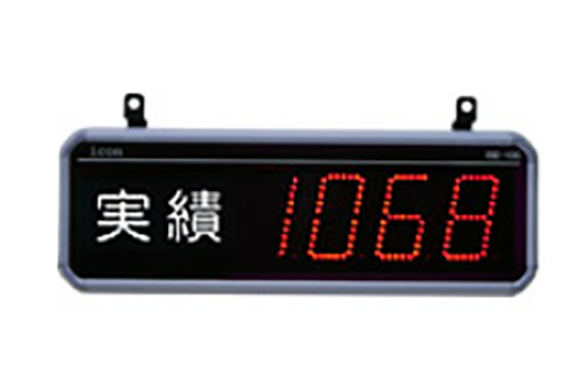
Manufacturer: Icon Co., Ltd.
Model: ISE Series
Lineup
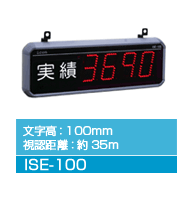
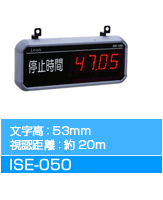
The ISE series is basically a dedicated type for each type of display data. Please select the software specification
type based on the type of data you want to display .
ISE-100 series (single-sided)
| Display row number | Number of digits displayed | Product Model |
|---|---|---|
| 1 stage | 4 digits | ISE-100-4 |
| 6 digits | ISE-100-6 | |
| 8 digits | ISE-100-8 |
ISE-050 series (single-sided)
| Display row number | Number of digits displayed | Product Model |
|---|---|---|
| 1 stage | 4 digits | ISE-050-4 |
| 6 digits | ISE-050-6 | |
| 8 digits | ISE-050-8 |
Function type (standard)
The ISE series is basically a dedicated type for each type of display data. Please select the software specification type based on the type of data you want to display.
| type | Display explanation | Nameplate example | Display units |
|---|---|---|---|
| COM | Communication data from PCs, sequencers, etc. (RS485) | – | – |
| CNT | Count number (pulse) by input terminal | Achievements | – |
| SPH | Actual count quantity per hour | SPH | – |
| SPM | Expected counts per minute | SPM | To one decimal place |
| CT | Time from previous result entry to current result entry | Cycle Time | seconds |
| TMR | Accumulation of ON time by input terminal | Downtime Setup time | Hours and minutes (4 digits) Hours, minutes and seconds (6 digits) (4-digit minute and second types are also available) |
| SC | Examples of custom-made displays : quantity x constant ÷ variable, measurement time ÷ constant (variable), etc. | – | Depends on the specifications |
Custom order examples
This is an example of a custom-made display using ISE series hardware. If the standard type does not have the data you need, please feel free to contact us.
Large, easy-to-read high-brightness LED display
Character heights of 53mm and 100mm are available, allowing you to select the one that best suits your site location. High-brightness LEDs are also used, allowing for clear display of numerical data.
| Font size | Font size | Visibility distance |
|---|---|---|
| 53mm | 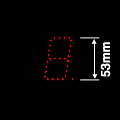 | Visibility distance: Approximately 20m |
| 100mm | 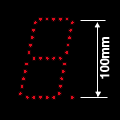 | Visibility distance: Approximately 35m |
Selectable display types
The ISE series is basically a dedicated type for each type of display data.
Please select the software specification type based on the type of data you want to display.
Customization to suit your needs through special orders
The ISE series can be customized to display the numerical data you want by simply adding functions. Please see the custom specifications
for details .
General specifications
| item | ISE-050-4 | ISE-050-6 | ISE-100-4 | ISE-100-6 |
|---|---|---|---|---|
| Display characters | Red LED dot segment display | |||
| Character height | 53mm | 100mm | ||
| Display row number | 1 | |||
| Number of digits displayed | 4 | 6 | 4 | 6 |
| Display surface | Single-sided (double-sided types can be made to order) | |||
| input | 4 points (non-voltage input) Impedance when shorted: 1 kΩ or less Residual voltage when shorted: 1.5 V or less Current flowing when 0 Ω is shorted: Approx. 7 mA | |||
| output | 2 points (transistor NPN open collector output) Maximum load current per terminal (DC 100mA, maximum applied voltage DC 24V) | |||
| communication | 1 port (RS485) | |||
| Setting device I/F | 1 port | |||
| Power outage compensation | With battery backup | |||
| environmental conditions | 0 to 40°C, 35 to 85% RH (no condensation) | |||
| Power supply voltage | 100 to 240 VAC | |||
| Power consumption | Max9W | Max 13W | Max 18W | Max 24W |
| weight | 1.8kg | 2.4kg | 2.7kg | 3.6kg |
Note: Actual available I/O will vary depending on the type selected.
Display type function table
| type | explanation | Display units |
|---|---|---|
| COM | Display of communication data Connect to a PC or PLC via serial communication (RS485) and display the received data as is. The communication protocol is publicly available, so users can create their own applications and display the data as they wish. Note: No input or setting device is used. Instructions | |
| CNT | Counter display A simple UP/DOWN counter. Input 1: +1 count Input 2: -1 count (counts even below 0) Input 3: Clear *Input 4, output 1, output 2, communication, and setting device are not used. Instructions | |
| CT | Cycle time display Measures actual takt (achieved takt) Input 1: Actual input The time from the previous input is updated and displayed for each input. Input 2: Clear *Input 3, Input 4, Output 1, Output 2, communication, and setting device are not used. Instructions | Seconds (in 0.1 second increments) |
| SPH | SPH display This can be used to understand the production pace. Input 1: Actual results input Displays the production volume per hour based on the interval between the most recent inputs. Input 3: Clear *Input 2, Input 4, Output 1, Output 2, communication, and setting device are not used. Instructions | |
| SPM | SPM display This can be used to understand the production pace. Input 1: Actual performance input Displays the production volume per minute based on the interval of the latest input. Input 3: Clear *Input 2, Input 4, Output 1, Output 2, communication, and setting device are not used. Instructions | To the first decimal place |
| TMR | ON time display Input 1: Accumulates and displays the time while the input is ON. Input 2: Clear *Input 3, Input 4, Output 1, Output 2, communication, and setting device are not used. Manual (hour:minute (4 digits) type) Manual (minute:second (4 digits) type) | Hour:minute (4 digits) Hour:minute:second (6 digits) * Minute:second (4 digits) type also available |
REQUEST QUOTATION
PAYMENT

LINK